
Getting started
Install Mocky, create the first account, and connect a text model.
Requirements#
Docker, or Node ≥ 22.12. The .nvmrc file pins 22.12, which is what the
node:22-slim image uses. The floor moved up from 20 when the quality pass
landed: its detector requires Node 22.12+, and Node 20 left support in April
2026.
There is no database and no native module to compile.
ffmpeg is the only external binary, and it is used only for scroll-driven
video. Without it everything else works, and that one feature reports itself as
unavailable rather than failing.
Install#
git clone https://github.com/PetitOursManu/Mocky.gitcd Mockydocker compose up -d --buildMocky listens on http://localhost:8787. Accounts, projects, images and video
sequences persist in the mocky-data volume.
The port is published on 127.0.0.1 only. Several routes spend your model
credits, so the instance is not reachable from the network until you say so. See
Deployment.
npm installnpm run dev:allThen open http://localhost:5173.
Use dev:all, not dev. npm run dev starts the web server alone, with no back
end. Mocky requires an account and accounts live on the back end, so the sign-in
box will report that it cannot reach it. Muse, the media library and syncing are
unavailable in that mode too.
In development, Vite proxies /api and /sso to http://localhost:8787, and
serves /__provider itself through a middleware that imports the back end's own
module (server/provider-proxy.js). Both environments therefore apply the same
SSRF guard and the same allowed-subpath list.
npm run build # tsc && vite build → dist/npm start # Express serves dist/, the API and the proxy on :8787npm start without npm run build starts successfully but every page is a bare
404. The server prints a warning, and /api/health answers 503 with
frontendBuilt: false. That is what the container health check reads.
First run#
The masthead is the same on every screen:

- Mocky Back to your projects from anywhere.
- The open project The project you are in. Its name is also the title of its lead card on the projects page.
- Home Your projects, their folders, and
New project. - DESIGN.md The design system every generation starts from, as Markdown you can edit or load.
- Media Every generated or uploaded picture, clip and film.
- Settings Your model provider, key and model, your account, and the end-of-generation chime.
- Admin The instance dashboard. Shown to administrators only.
- Docs This documentation, in a new tab.
- Theme Papier or Encre. The icon shows where you are going, not where you are.
- Account Your picture and name; the menu signs you out.
Open MockyDone
The sign-in box appears and cannot be dismissed. There is no anonymous mode.
Create the first accountDone
It becomes the instance administrator. There is no password-reset flow, and promoting another account means editing
server/data/users.jsonby hand.Configure a text modelDone
See the next section.
Describe a screen and generate itDone
Who becomes the instance administrator?
The first account created on an empty instance is the administrator. There is no reset flow, so create it yourself, right after installing.
Not quite. Try again.
The , where a screen is described:
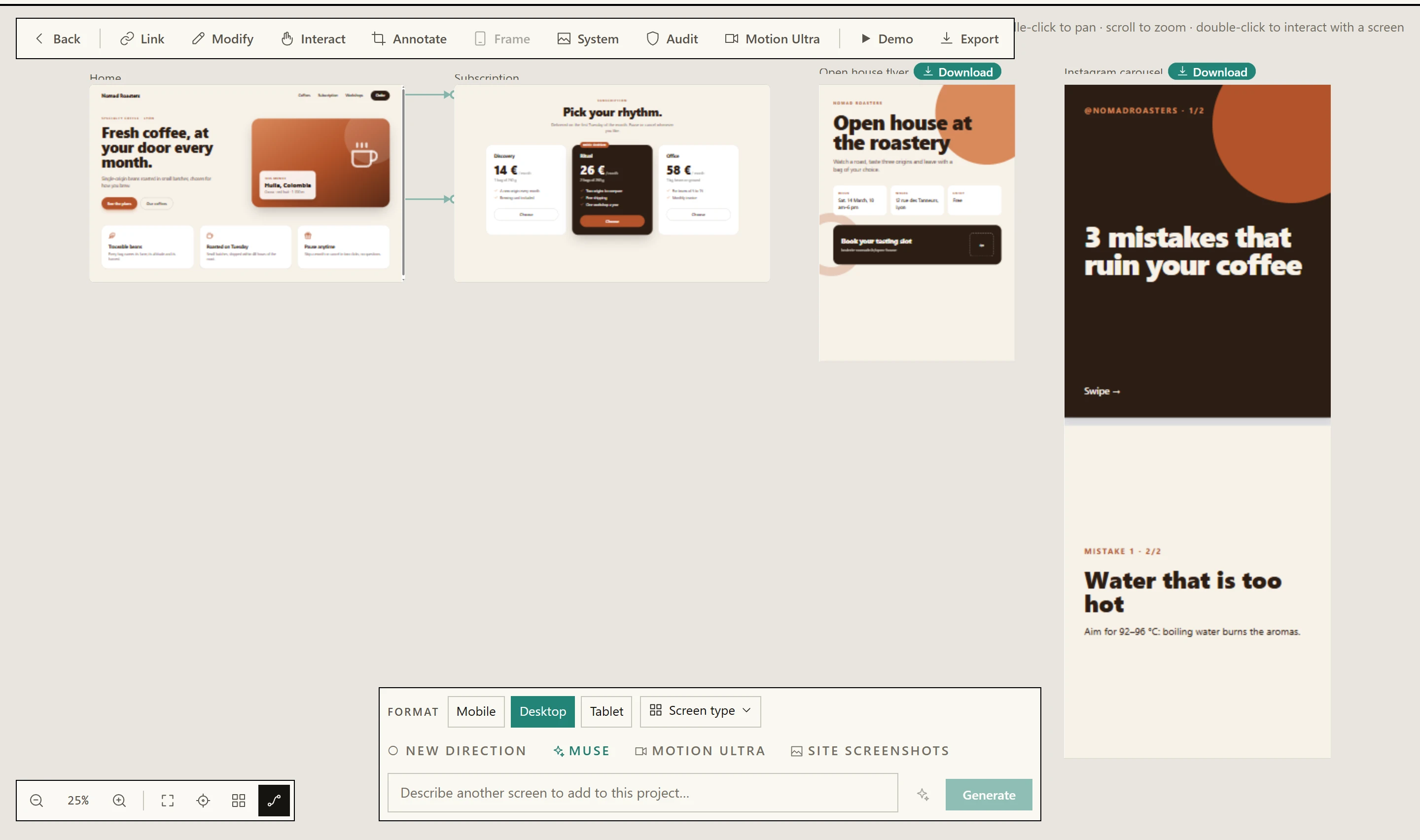
- Format Mobile, Desktop or Tablet for a screen. For a document, the same chips become page formats.
- Screen type The kind of screen or document; its structure guides the generation. It stays armed until you remove it.
- New direction This prompt rewrites the project’s art direction. It unticks itself after the screen.
- Muse Inspiration, an art direction, real copy and pictures for the next screen.
- Motion Ultra A project setting: a storyboard and a series of pictures for each new screen.
- Screenshots of a site Attach screenshots of an existing site to reproduce it or redesign it. They are never stored.
- The prompt Describe the screen.
Ctrl/⌘ + Entersends it. - Improve Rewrites your few words into a complete brief for the chosen format and type.
Back to your textundoes it. - Generate Creates the screen — or
Updatewhen screens are selected.
A project keeps one , so its screens look like one product rather than five sketches. It is set by the first screen you generate and then left alone. New direction is the exception: tick it and the prompt you are about to send rewrites the direction for every screen after it. It unticks itself once that screen is generated — it is a one-off, not a mode.
Two other things travel between screens without being asked for: the product's name and its logo. A design direction describes a palette and a voice, so nothing in it stops a second screen inventing a second brand — which is exactly what happened until the first screen started being shown to the model as the identity to match. The nav, the sections and the layout stay free; pin a screen as a layout reference (right-click a screen) if you want those fixed too.
Two buttons in the zoom bar do the navigating for you. Fit all frames every screen and — this is the part worth knowing — keeps doing so: open a panel, resize the window, turn a tablet, and the board re-frames itself, until you pan or zoom by hand, which hands the view back to you for good. Zoom to the latest screen jumps to the one you generated most recently, which is not necessarily the one you have selected. Both are in The interface with the rest of the bar.
The home page after a first generation:
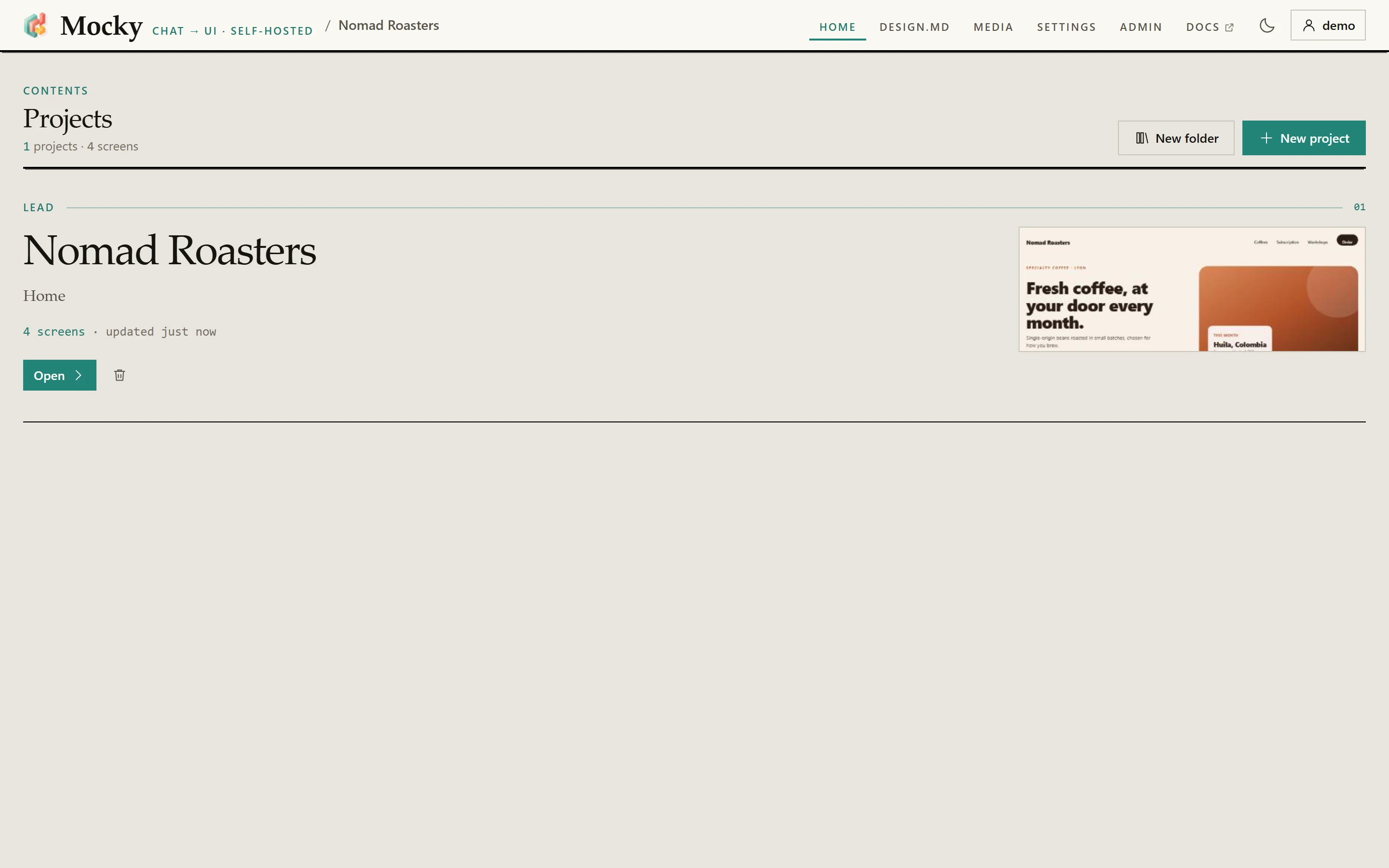
- Navigation The same on every page.
- Theme Papier or Encre, remembered by the browser.
- Account Signed in: your projects follow you from one device to another.
- New project An empty canvas, named after its first prompt.
- New folder Folders are names on projects; drag or file a project to fill one.
- The lead project The most recent, with its screens.
Opengoes in; the others are listed below, by folder.
Account rules#
| Rule | Value |
|---|---|
| Minimum username length | 3 characters |
| Password at public sign-up | 8 characters (MIN_NEW_PASSWORD) |
| Password created or reset by an admin | 8 characters (MIN_NEW_PASSWORD) |
| Session lifetime | 90 days, sliding |
| Auth rate limit | 8 attempts per minute per IP |
All three paths now ask for the same length. Public sign-up accepted six characters — and it is the one path an attacker can reach without a session, where on a fresh instance the account they create is the administrator.
Public sign-ups also close themselves once the first account exists. An administrator reopens them from the Admin screen to invite someone.
Passwords are hashed with scrypt from node:crypto and compared in constant
time. Changing a password revokes every session, including the current one,
which immediately receives a fresh token.
Configure a text model#
There are two modes and they are mutually exclusive. The instance mode always wins over the browser mode.
Mode A — per browser (default)#
Go to Settings, choose a provider, paste your API key, pick a model and press
Test connection. The list is grouped — the model makers (OpenAI, Anthropic,
Google Gemini, Mistral, DeepSeek, xAI, Moonshot), the hosts that serve open models
(Ollama Cloud, OpenRouter, Groq, Together, Fireworks, Cerebras, Hugging Face), and
Compatible OpenAI for anything else — and each one fills in its own base URL and
a default model. Ollama Cloud, at https://ollama.com, is the default.
The key is stored in that browser's localStorage under mocky.settings.v1 and
is never written server-side. It passes through /__provider as an
Authorization header for the duration of each request.
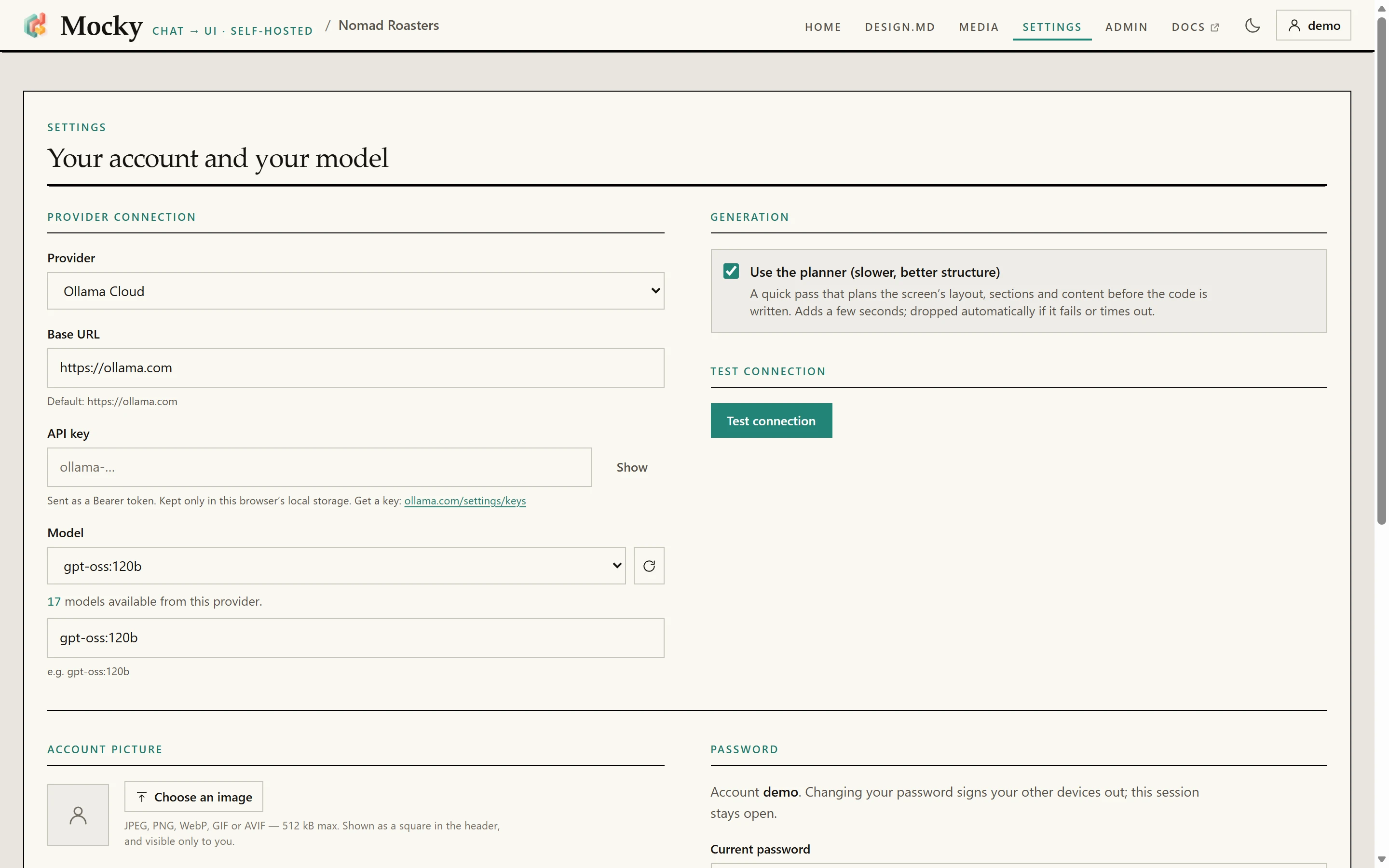
Compatible OpenAI for the rest.- Provider Sixteen, grouped: model makers, hosts of open models, and
Compatible OpenAIfor the rest. - Base URL Filled in by the provider. Change it only for your own server.
- API key Kept in this browser only, sent as a Bearer token with each request.
- Model Listed from the provider once the key is set; you can also type a name.
- Test connection One small request that says whether the key and the model answer.
Settings. This is the per-browser mode: the key is stored in this browser only.
This mode used to offer a single provider, Ollama Cloud — not because the others
could not work, but because the browser never told the server which dialect its
endpoint spoke. It does now (the x-provider-kind header), and
src/lib/settings.ts offers the same list as the Admin screen, minus fal, whose
Key authentication cannot ride the Bearer header a browser sends. The two lists
are held equal by tests/text-providers-mirror.test.js.
Lower on the same page, Notification decides whether Mocky tells you when a
generation finishes while you are in another tab:
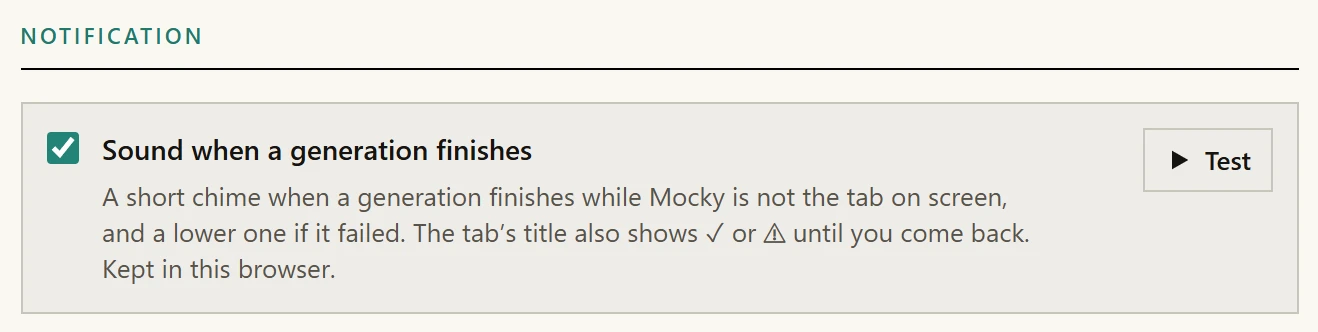
- Sound when a generation finishes A short chime when a generation ends while Mocky is not the tab on screen, a lower one if it failed, and ✓ or ⚠ in the tab’s title.
- Test Plays it now, so you can check your speakers.
Mode B — instance-wide (administrator)#
Go to Admin → Providers, section Text models. The key is stored on the server in
server/data/text-config.json, used by every account, and each user's personal
Settings are then ignored.
server/text/config.js declares sixteen providers.
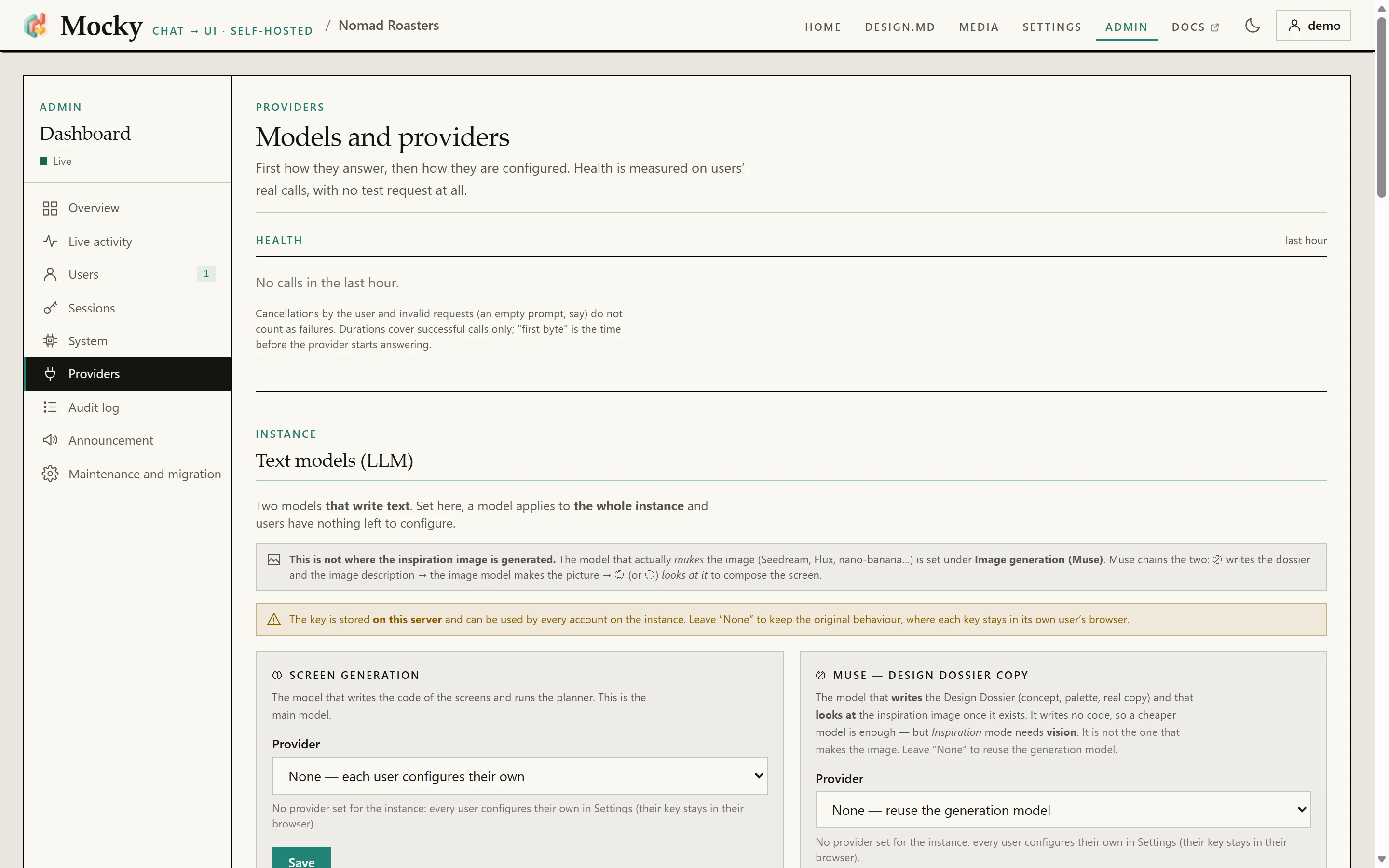
- The dashboard Overview, live activity, users, sessions, system, providers, audit log, announcement, maintenance. See The admin dashboard.
- Screen generation A provider set here is used by every account, and personal Settings are ignored.
Nonekeeps each user on their own key. - Muse — design dossier An optional second, cheaper model for Muse;
Nonereuses the generation model.
Admin. A model set here is used by every account on the instance, and each user’s personal Settings are ignored.
| id | Dialect | Default base URL | Default model |
|---|---|---|---|
ollama-cloud | Ollama | https://ollama.com | gpt-oss:120b |
openai | OpenAI | https://api.openai.com | gpt-4o-mini |
anthropic | OpenAI | https://api.anthropic.com | claude-sonnet-4-5 |
gemini | OpenAI | https://generativelanguage.googleapis.com/v1beta/openai | gemini-3.8-flash |
mistral | OpenAI | https://api.mistral.ai/v1 | mistral-medium-latest |
deepseek | OpenAI | https://api.deepseek.com | deepseek-flash |
xai | OpenAI | https://api.x.ai/v1 | grok-4.7 |
moonshot | OpenAI | https://api.moonshot.ai/v1 | kimi-k3 |
openrouter | OpenAI | https://openrouter.ai/api | openai/gpt-4o-mini |
groq | OpenAI | https://api.groq.com/openai/v1 | openai/gpt-oss-120b |
together | OpenAI | https://api.together.ai/v1 | openai/gpt-oss-120b |
fireworks | OpenAI | https://api.fireworks.ai/inference/v1 | accounts/fireworks/models/gpt-oss-120b |
cerebras | OpenAI | https://api.cerebras.ai/v1 | gpt-oss-120b |
huggingface | OpenAI | https://router.huggingface.co/v1 | openai/gpt-oss-120b |
fal | OpenAI, Key auth | https://fal.run/openrouter/router/openai | openai/gpt-4o-mini |
openai-compatible | OpenAI | (you fill it in) | (you fill it in) |
openai-compatible covers the rest — Qwen, Cohere, LM Studio, vLLM — anything
exposing the OpenAI chat API. A base URL that already ends in a version (…/v1,
or …/v1beta/openai) is used as it is; any other gets /v1 added. That is why
the URL a vendor's documentation tells you to paste works as pasted.
The Usage block on the same screen#
Below the two model columns, full width, sits Usage — one row per account with a bar. It is full width rather than tucked inside the account list because a row with a bar needs the width to stay readable at the sizes the grid gives a column.
Per account: three labelled counts — Projects, Screens, Media — and the total on disk, right-aligned. The bar under the row carries the breakdown as its tooltip: "{data} of projects · {media} of media · {avatar} of avatar".
It is its own route, GET /api/admin/usage, and that is not an accident of
layering. Producing it means parsing every user's projects blob — the one thing
the server otherwise treats as an opaque string — and walking a directory per
scroll sequence. Folded into the account list, everyone who opened the Admin tab
would pay that cost whether or not they were looking.
Three readings are worth knowing before you act on the table:
Unreadable dataagainst an account, and an em dash where its project and screen counts would be. A blob that will not parse has not got zero projects, and a confident nought would send you hunting for a problem that is yours. The bytes are still counted; only the breakdown is missing.- "including {n} deleted, still waiting to sync" under a project count. Tombstones stay in the blob so a deletion can travel to the user's other devices. They cost storage without being projects, which is exactly the kind of gap that makes a total look wrong.
No owner, on its own line at the bottom. Media added before ownership was recorded, or belonging to a deleted account. Those bytes are real and their owner is unknown, so they are reported apart rather than guessed at or spread over everyone. Media is deduplicated, so a file two people uploaded is one file whose size is split between them — which is what keeps the column adding up to what the volume actually holds.
Top right of the section header, beside the word Usage, sits the instance
total against MOCKY_MAX_STORAGE_MB — or "no ceiling" when that variable is
set to 0. See Deployment.
Setting up OpenRouter#
- Admin → Text models → Generation profile → OpenRouter.
- Base URL:
https://openrouter.ai/api. Do not add/v1. The dialect layer appends/v1/chat/completionsitself, so an extra/v1produces a 404 on/v1/v1/chat/completions. - API key: your
sk-or-…value, sent asAuthorization: Bearer …. - Model: the full OpenRouter identifier, in
vendor/modelform. For exampleopenai/gpt-4o-mini,anthropic/claude-3.5-sonnetorgoogle/gemini-2.5-flash. - Press Test. It sends a real request through the same translation layer the app uses.
The test distinguishes three kinds of failure:
- a non-2xx HTTP response;
- an empty reply from a reasoning model that spent its token budget thinking;
- a reply cut short, reported as
finish_reason: length.
HTTP 200 with no visible text is not a success, and the test says so. That model would produce empty screens.
A common mistake. Pasting an image model identifier into the text field. This is easy with fal, which sells both under one key. The provider answers "is not a valid model ID", which explains nothing.
looksLikeImageModel()recognises the pattern —text-to-image,flux,seedream,sdxl,dall-e,veo,klingand similar — and shows a message that names the problem.
The two text profiles#
| Profile | Job | Receives the inspiration image |
|---|---|---|
generation | Writes the screens and runs the planner | Yes. It is the profile probed for vision support |
inspiration | Writes Muse's design dossier | Only when probed explicitly |
The profile travels as an x-mocky-profile: inspiration header. Anything else,
including no header at all, means generation.
Leaving the inspiration profile empty makes it fall back to generation, which
is the original single-model behaviour. The dossier writes no code, so a cheaper
model is usually enough.
Configuration files written before profiles existed are a single flat object.
liftLegacy() lifts them into generation on read, with keys intact.
What the proxy accepts#
/__provider forwards two subpaths and nothing else:
export const ALLOWED_SUBPATHS = new Set(['/api/chat', '/api/tags'])This is an allowlist, not a filter. Before it existed, a
DELETE /__provider/api/delete carrying {"name":"llama3"} reached the
configured Ollama and deleted a model. The body rewrite only ever replaces
model, so name passed through untouched.
Redirects are surfaced, not followed (redirect: 'manual'). A target that passes
the SSRF guard and then answers 302 → http://169.254.169.254/… would otherwise
walk straight around it.
Configure image generation#
Go to Admin → Image generation (Muse). Keys are stored on the server and
never sent back to the browser: publicView() replaces each one with a
hasApiKey or hasToken boolean.
The Test button really generates a throwaway image — a red apple on a white background, 1024×1024 — and does not store it in the library.
| Provider | Key | Notes |
|---|---|---|
pollinations | No | The default. Free and URL-based; may watermark. Limited to roughly one request every 15 seconds, so requests are queued server-side. An optional free token raises the limit |
fal | Yes | fal.ai, FLUX and similar. The synchronous endpoint is used, so prefer a fast model. The only provider that can produce video |
openai-image | Yes | Any endpoint exposing POST {baseUrl}/v1/images/generations: OpenAI, LiteLLM, compatible gateways |
cloudflare-workers-ai | Yes | Generous free tier. Needs an account id and a token with the Workers AI permission |
sd-webui | No | Your own Automatic1111, Forge or SD.Next instance started with --api. Nothing leaves your machine |
none | — | Muse still runs. Image slots get palette-derived placeholders |
Three image profiles#
The three jobs are genuinely different, so they have separate settings.
content produces the pictures placed in the screen: hero images, products,
backgrounds. There can be several per screen, so it should be fast and cheap.
This is the original zero-configuration path, and Pollinations is its default.
inspiration produces the single art-direction reference shown to the model.
It has to be convincing, so it is worth a slower and more expensive model.
Leaving its provider empty makes it fall back to content.
edit does image-to-image: an existing picture goes in, a derivative comes
out. It is the profile behind Motion Ultra's variants. Optional like
inspiration, but optional the other way round: leaving it empty falls back
to nothing at all, and means image-to-image is off on this instance. A
text-to-image model handed a source image would return a picture drawn from the
prompt alone, presented as a derivative of the user's own — and nothing
downstream could tell the two apart. Borrowing the content profile's key would
therefore be exactly the lie this profile exists to prevent.
Its provider list is shorter than the others, and the panel says why: only fal,
openai-image, cloudflare-workers-ai and sd-webui accept an input image.
Pollinations cannot — its API takes a URL that its servers fetch, and Mocky's
images are served only by your own instance. The default models differ from the
text-to-image ones too (fal-ai/flux/dev/image-to-image,
@cf/runwayml/stable-diffusion-v1-5-img2img): inheriting the others would ship a
profile configured to fail. The "Test" button sends a real source image, because
a text-to-image test passes against a model that cannot edit at all.
sd-webuiis called by Mocky's own server and points at a local address by definition, so it deliberately bypasses the SSRF guard applied to untrusted URLs. Only an administrator can set it.
Scroll-driven video#
Two independent prerequisites. Admin → Image generation → Video reports them separately, because they are fixed in completely different places.
| Prerequisite | Detail |
|---|---|
| A video provider | fal only. No other configured provider has a text-to-video endpoint. The default model is fal-ai/ltx-video |
ffmpeg | Shipped in the Docker image. Running from source, install it yourself |
GET /api/videos/availability returns
reason: 'no-provider' | 'no-key' | 'no-ffmpeg' | null, ordered by what to fix
first.
Importing your own clip needs only ffmpeg — no provider, no key, no cost.
An instance that has never configured fal can therefore use the whole feature
with its own footage.
Motion Ultra#
A different feature from the one above, and the singular is how you tell them
apart in the code: server/videos/ cuts scroll sequences, server/video/ builds
films. This one turns images from the media library into an .mp4.
It is off by default and its renderer is not installed by default, which is a licensing decision rather than a technical one. Remotion is free for individuals, non-profits and companies with up to three employees, and its licence does not address redistribution inside a self-hosted product — so it lives in a separate image nobody builds by accident. Why the whole feature is shaped around that is in Motion Ultra.
Three steps, in this order.
1. Build and start the worker. From the repository root:
docker compose --profile video-export up -d --buildWithout --profile video-export nothing here is built, created or started, and
docker compose up -d behaves exactly as it did before. Building this image is
the moment the licence question becomes yours: read
https://www.remotion.dev/ first, and note that the threshold counts your
organisation's employees, not this instance's accounts.
2. Turn it on in Admin → Motion Ultra.
| Setting | Detail |
|---|---|
| Enable Motion Ultra | The master switch. Off, nobody exports, whatever the scope says |
| Scope | Everyone, or an allowlist. An administrator is not allowed implicitly — a render costs CPU and is counted per account, so access is granted explicitly, to yourself included |
| Render worker URL | http://video-worker:3030 by default, which is the compose service name on an internal bridge. It looks like it should not work — it is the third administrator-only bypass of the SSRF guard, and the reasoning is in the invariants |
| Remotion licence key | Optional. Stored server-side, never returned to the browser. Entering one turns on the outbound telemetry a licensed render requires from Remotion 5.0 onwards; with no key the worker container has no network egress at all |
The panel probes the worker and reports Available with its version,
Unreachable, Not configured, or an address it refused before making any call.
That last one is worth reading carefully: nothing was contacted, so restarting
the worker changes nothing — only http:// and https:// are accepted.
3. Use it. More → Motion Ultra inside a project. Twenty scenes at most, two
minutes at most, and no audio.
Variants — "Start from an image" in that panel — are the one part that leans on
another setting. With an edit image profile configured they are real
derivations of your picture; without one they are siblings born of the same text,
and the panel says which before you spend the provider calls.
MCP servers#
Local MCP servers are declared in mocky.mcp.json at the repository root and
spawned by the back end over stdio. The shipped file declares one server:
{ "mcpServers": { "fetcher": { "command": "npx", "args": ["-y", "fetcher-mcp"], "autoStart": false, "role": "inspiration-fetch", "idleTimeoutMs": 300000 } }}The router maps semantic roles to whichever server exposes a matching tool,
so you can swap servers without touching code. Health is reported at
GET /api/mcp/status. Details are in the
inspiration engine page.
A missing or invalid file is never fatal. It produces an empty server list, and Muse falls back to its offline pattern library.
Maintenance commands#
npm run backup # → backups/mocky-YYYY-MM-DD-HHmm.zipnpm run backup -- <dir> # write somewhere elsenpm run check:vendor # verify the vendored bundles against their hashesnpm test # vitest run, the full suitenpm run test:watchnpm run backup is plain Node and reuses the repository's own dependency-free
ZIP writer, so it behaves identically on Windows, macOS and Linux.
For a Docker instance, copy the data out of the volume first:
docker compose cp mocky:/app/server/data ./server/datanpm run backupThe archive contains password hashes and session tokens. backups/ is
git-ignored; keep it that way.
Troubleshooting#
| Symptom | Likely cause |
|---|---|
| Every page is a 404 but the API answers | npm start without npm run build. /api/health reports frontendBuilt: false |
| Sign-in cannot reach the back end | You ran npm run dev instead of npm run dev:all |
EADDRINUSE on startup | Another Mocky is on the port. Use MOCKY_PORT=8788 npm start |
| Nine failed logins lock out the whole instance | A reverse proxy without TRUST_PROXY=1. Every request appears to come from 127.0.0.1, so the rate limit becomes one shared bucket |
| HTTP 401 or 403 from the provider | Missing or invalid key. In instance mode the browser's key is ignored; the administrator's key is the one that counts |
| A screen is cut off mid-string | The model hit its output cap. Mocky detects this through done_reason or finish_reason being length and says so, instead of leaving a cryptic syntax error |
Blank preview, console full of origin 'null' CORS errors | The mockup tried to navigate away from itself. The parent reloads the srcdoc and shows a "links are inert" notice |
| Muse does nothing | Muse requires the back end. In pure localStorage mode the toggle is hidden |
Thanks for your feedback!