
Mocky
Mocky is a self-hosted screen generator. You describe an interface in plain language and get a real React + Tailwind component, compiled and rendered live on an infinite canvas.
These pages describe how the project is built and why the non-obvious decisions were made. They assume you know React and TypeScript.
The repository
README.mdis the product overview: what Mocky does and how to install it quickly. This documentation covers the internals.
A project, open. Click the numbers to see what each part is:
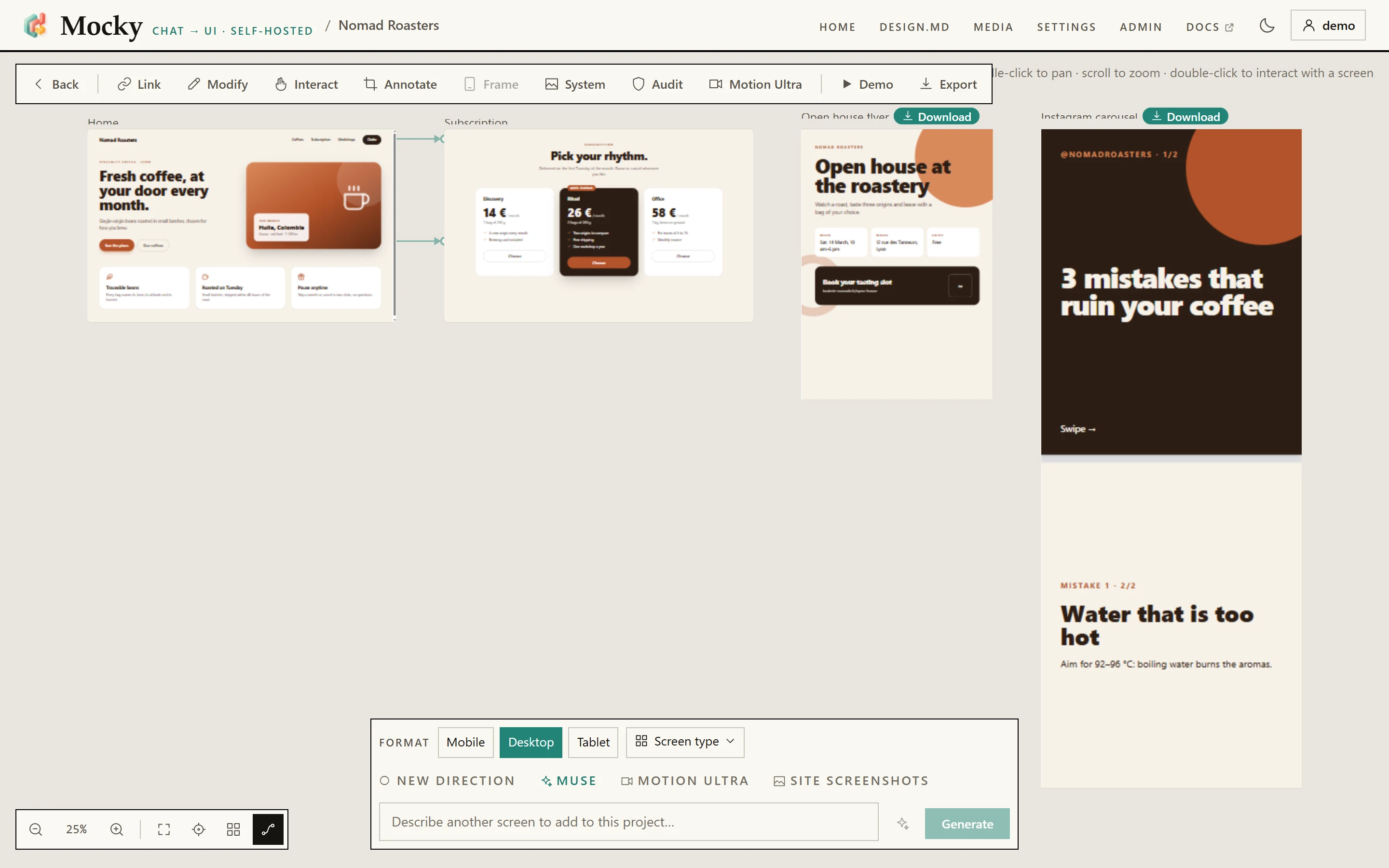
Home lists your projects; DESIGN.md, Media, Settings, Admin and Docs open over the project.- Main navigation
Homelists your projects;DESIGN.md,Media,Settings,AdminandDocsopen over the project. - Project toolbar Link, modify, interact, annotate, the side panels,
DemoandExport. Each is described in The interface. - A generated screen A real React + Tailwind component, rendered live. Double-click to use it, right-click for its menu.
- A cable A link from an element of one screen to the screen it opens — the map of the prototype
Demoplays. - A document A flyer, a report, a post: fixed pages. Its
Downloadpill gives a PDF, a.pptxor PNG images. - Zoom bar Zoom,
Fit all, the latest screen,Arrange, and the switch that shows or hides the cables. - Screen type What the next screen is — a dashboard, a pricing page — or which document. It stays armed for the project.
- The prompt Describe a screen in your own words. With a screen selected, the same field describes a change to it.
- Generate Creates the screen. With screens selected, it reads
Updateand edits them instead.
The stack#
| Layer | What it is |
|---|---|
| Front end | React 18, TypeScript, Vite, Tailwind CSS |
| Back end | Node ≥ 22.12 with Express. JSON files on disk. No database, no native dependencies |
| Preview | An iframe sandboxed to an opaque origin. React, ReactDOM, Babel and Tailwind are vendored locally. JSX is compiled inside the iframe |
| Models | Mocky always speaks the Ollama dialect internally. A proxy translates to OpenAI-compatible APIs |
| External binary | ffmpeg, used only for scroll-driven video |
| Optional separate service | The Remotion render worker in worker/video/, behind the video-export compose profile. Absent from the default image, for licensing reasons |
The one thing to know first#
The generation pipeline runs in the browser, not on the server.
Capability selection, the planner, generation, editing, auto-repair and
persistence all live in src/lib/. The back end is deliberately thin: it serves
static files, handles accounts, syncs one JSON file per user, and proxies model
requests.
There is one exception. Muse has to spawn processes, drive a headless browser
and write files, so its stages live in server/muse/. It is the project's first
real server-side pipeline, and ADR 001 explains the reasoning.
Where to start#
.mp4 for a screen out of a catalogue of blocks — and know why its renderer ships separately.DeploymentDeploy Mocky.Maintenance and migrationPut the instance in read-only mode, or move it to another server.Admin dashboardSee who is connected, what the machine is doing, and who changed what.Architecture overviewUnderstand the capability registry, the planner and the sandbox.InvariantsKnow which rules the code refuses to break, and why.What happens when you generate a screen#
Seven steps. Steps 1 and 3 are optional.
| # | Step | Where | Notes |
|---|---|---|---|
| 1 | Muse builds a design dossier | Server, via POST /api/muse/dossier | Optional. Produces an art direction, real copy and a generated image |
| 2 | selectCapabilities() picks a shortlist | Browser | Deterministic keyword matching. No model call |
| 3 | planScreen() refines the shortlist | Browser | Optional. Returns null on any failure, and the shortlist is used unchanged |
| 4 | applyAnimationMode() applies your motion preference | Browser | Three states: auto, on, off |
| 5 | generateComponent() streams the component | Browser, via POST /__provider/api/chat | NDJSON stream, sentinel-delimited output |
| 6 | stripForbiddenMotion() removes raw Motion code | Browser | Babel AST walk, never a regular expression |
| 7 | | Browser | Sandboxed iframe with a strict CSP |
Each step is covered in the architecture overview.
Four properties worth knowing up front#
They explain a lot of the code you will read.
Muse off means nothing changes. With the toggle off, the request sent to the
model is byte-for-byte what it was before Muse existed. The dossier enters through
extraSystem, the same parameter DESIGN.md already used.
No optional step may block. The planner resolves to null on any failure. A
Muse stage that fails degrades and the generation continues.
A quality run can never fail a generation. That is the rule above again, and it matters more here because of where the pass sits. Muse runs before a generation, so a Muse failure is a screen built with less; the quality pass runs after one that already succeeded, on a screen the user is looking at. So every stage degrades and returns a report, and none of them throws at the caller: a failure to check a screen must never look like a failure to make one. Invariant Q1.
Failure is static, never broken. An unknown animation preset renders a plain element. A missing library falls back to CSS. A retired capability is still injected for the screens that use it.
How this documentation is served#
The pages are built by Lumy, a
documentation tool written for Mocky and published on its own, open source. The
Markdown in docs/ stays the source; Lumy turns it into a site with search,
both languages, a light and a dark theme, and blocks a reader can interact with.
docs-site/ holds its configuration and Mocky's own widgets. See
Deployment, which explains how the site is built and served.
To read the site locally before publishing a change to it:
npm run docsThat serves it on http://127.0.0.1:4173 and rebuilds it on every save.
npm run docs:check looks for broken links and blocks Lumy does not know, and
CI runs it on every push.
Ces pages existent aussi en français : documentation française.
Other documents in this repository#
These predate this documentation and remain authoritative on their subjects. Each of the four now exists in both languages.
| Document | Subject | English | Français |
|---|---|---|---|
| Repository README | The product overview: what Mocky does, and how to install it quickly | README.md | README.fr.md |
| ADR 001 — Muse | The full architecture decision record, including the first written statement of the eight original invariants | adr/001-muse.md | fr/adr/001-muse.md |
| Design system | Mocky's own interface tokens, the Papier and Encre themes, the UI primitives. Not to be confused with the DESIGN.md a user supplies for generated screens | DESIGN-SYSTEM.md | fr/DESIGN-SYSTEM.md |
| Audit 2026-07 | The multi-agent audit and its roadmap, most of which has since been applied | AUDIT-2026-07.md | fr/AUDIT-2026-07.md |
tests/docs-parity.test.js holds each pair together: the same number of
headings, the same levels in the same order, and, in the last three, a "why"
block under every heading, which the site folds away until it is asked for.
They used to exist in one language each, and that was defended as deliberate —
an ADR is a dated record, so translating it invites two versions that disagree.
What the argument missed is that the interface had already been through the
identical failure: a single row of buttons reading "Rename", "Voir le prompt qui
a créé cet écran", "More options", "Delete screen". A French design system, an
English ADR, a French audit and an English README are that row spread over four
files, with no way to tell which reader each was written for. The fix is the one
src/i18n had already found — a complete file per language, kept in step by a
test.
They first gained twins suffixed with the other language, so DESIGN-SYSTEM.md
was the French page and DESIGN-SYSTEM.en.md the English one. When the site moved
to Lumy they joined the rest of docs/: the bare path is English, and fr/
holds the translation, path for path.
Thanks for your feedback!